

Codex now builds an app from one prompt and hosts it for you. What can you ship without code?
OpenAI's June update lets Codex build an internal app from a plain prompt, host it on its own servers and hand you a shareable link. Plus six role plugins and annotations for people who do not code.
News analysis
Codex + ChatGPT
What is new
On 2 June 2026 OpenAI shipped a Codex update built around one idea: let people who do not write code build and ship working tools. The headline feature is called Sites.
With Sites you describe an internal app in plain English, and Codex builds the whole thing, hosts it on OpenAI's own servers and returns a shareable URL. Access runs through Sign in with ChatGPT, so only people in your workspace can open it. No deploy pipeline, no separate hosting account, no ticket to the platform team.
The same update added six role plugins and a feature called annotations. The plugins bundle 62 business apps, including Snowflake, Figma and Salesforce, and 110 ready-made skills across sales, data analytics, creative production, product design, public equity investing and investment banking. Annotations let you point at the exact part of a document, spreadsheet or slide and tell Codex what to change, the same way developers already refine code.
Codex has grown since the June launch. August brought portable Agent Plugins, persistent conversation sections, automated step approvals and support for the MCP protocol in its 28 July 2026 revision. Sites availability has not changed, it is still Business and Enterprise only.
The direction is clear when you look at who uses Codex now. Non-developers such as analysts, marketers and operators make up about 20 percent of users and are growing roughly three times faster than developers.
Sites
Role plugins
Annotations
What you'll appreciate most
It closes the gap between an idea and a working tool. An internal app that used to mean a two-week ticket for a junior developer now ships inside a single Codex session. You describe it, Codex builds it, and the link works.
You stay in plain language the whole way. Codex handles the build, the server and the login, so there is nothing to deploy and no auth to wire up. Your data can stay where it already lives, in Google Drive, Slack or your CRM, connected through the OAuth flows you already use. Codex runs the app layer on top of it.
Who it is for
If you have ever wanted a small internal tool but could not justify pulling an engineer onto it, this is aimed squarely at you. It fits people who know exactly what they need but have no way to build it themselves.
Marketer
- Campaign tracker
- Content calendar
- UTM dashboard
- Launch checklist
Analyst or ops
- Pipeline dashboard
- Vendor tracker
- Approval flow
- KPI board
Founder
- Hiring tracker
- Investor updates
- Internal CRM
- Expense flow
How to use it in practice
You open Codex, call the Sites plugin and describe the tool in one or two sentences. Be concrete about the data and the filters you want, for example "a dashboard showing the Q2 sales pipeline by region, with filters by deal size and last activity date."
Codex then builds the app, deploys it to OpenAI hosting and returns a link. You share that link with your workspace, and anyone who can sign in with ChatGPT can open it. When something is off, you do not start over. You point at the part you want changed and tell Codex what to fix.
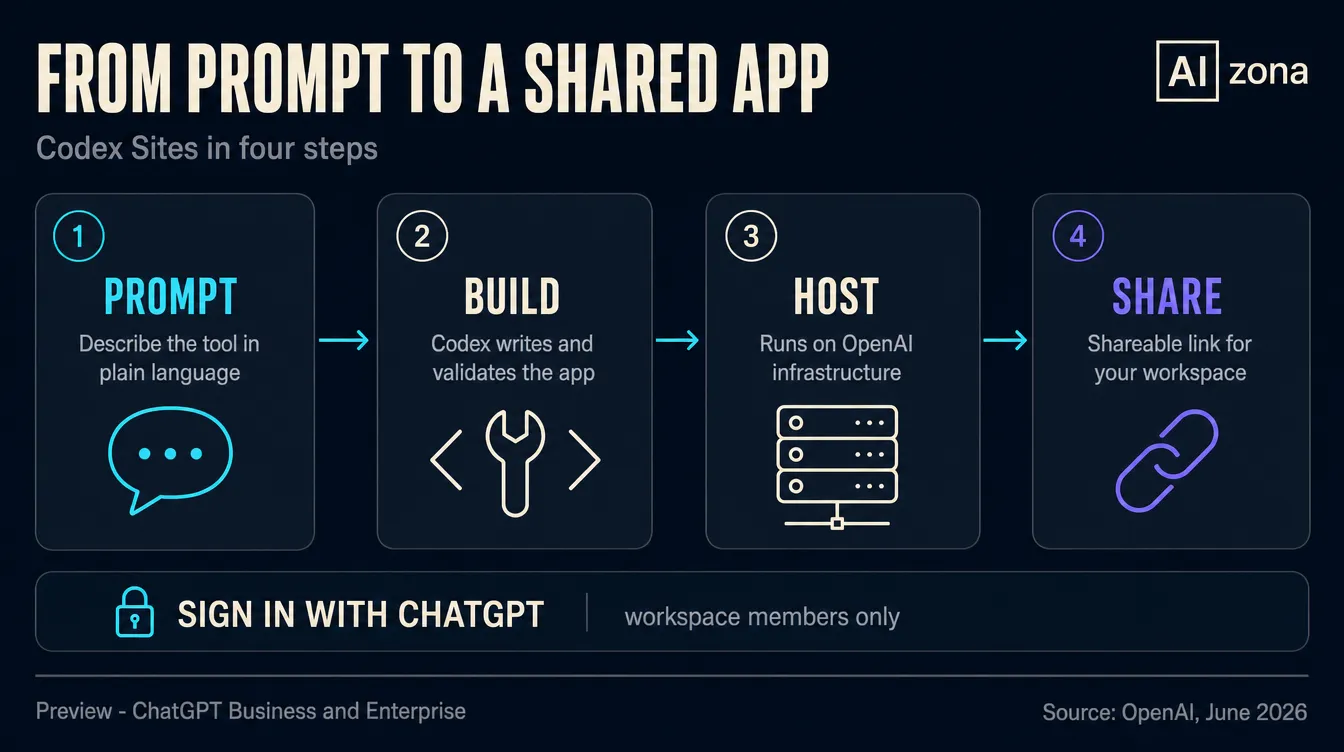
One thing to check before you rely on it: availability. Sites is in preview. It is on by default for ChatGPT Business, available as an Early Access toggle for Enterprise, and not yet on Plus, Pro or Free. Treat it as a fast way to build internal tools, not as a home for anything mission critical.
A real-world example
Your marketing team keeps rebuilding the same Q2 pipeline view in spreadsheets every Monday. You open Codex and ask for a dashboard that pulls deals from your CRM, groups them by region and filters by deal size and last activity. Codex builds it, hosts it and gives you a link. You drop the link in your team channel, everyone signs in with ChatGPT, and the Monday spreadsheet ritual is gone. When sales asks for a "stalled deals" view, you annotate the dashboard and Codex adds it in minutes.
Recommended tools
Reach for Codex Sites when your team already works in ChatGPT and you need an internal tool fast, with login and hosting handled for you. If you expect the thing to grow into a real product, or you need to own the code, a builder that hands you the source is the safer bet.
Codex Sites
OpenAI
Best for
Teams on ChatGPT Business or Enterprise who need internal tools fast.
Lovable
Lovable
Best for
Makers who want a real codebase they can host anywhere.
Replit
Replit
Best for
People comfortable touching code who want full control.
Summary
Codex Sites is the clearest sign yet that building small software is becoming a job for whoever has the idea, not just whoever can code. Describe the tool, get a hosted link, share it with your team. The limits are real: it is in preview, access stops at your ChatGPT workspace, and you cannot easily take the code with you. For everyday internal tools, that is a fair trade. For anything you plan to ship to the world, keep a real codebase. Either way, the bar for turning an idea into a working app just dropped hard.
Sources
Frequently asked questions
What people often ask
What is Codex Sites?
Codex Sites is a feature OpenAI launched on 2 June 2026 that turns a plain-language prompt into a working web app. You describe the tool you need, such as a sales pipeline dashboard or a hiring tracker, and Codex builds the full app, hosts it on OpenAI's own infrastructure and returns a shareable URL. There is no deploy pipeline, no separate hosting account and no DevOps ticket. Access is handled by Sign in with ChatGPT, so only people in your workspace can open it.
Do I need to know how to code to use it?
No. That is the main reason it exists. Non-developers such as analysts, marketers and operators now make up about 20 percent of Codex users and are growing roughly three times faster than developers. You write what you want in one or two sentences and Codex handles the build, the server and the login. A little structure in how you describe the tool helps, but you never touch a terminal or a config file.
How is Codex Sites different from Lovable or Replit?
All three turn prompts into apps, but the trade-offs differ. Codex Sites is the easiest path if your team already lives in ChatGPT, because hosting and login come built in. The catch is portability: there is no easy code export, so moving an app off OpenAI later is hard. Lovable and Replit give you the underlying code and broader hosting options, which suits anything you might grow into a real product. For quick internal tools, Sites wins on convenience.
Is it safe to share company data through a Codex Site?
It depends on your plan and setup. Sites run on OpenAI infrastructure, while your data can stay in connected systems like Google Drive, Slack or your CRM through existing OAuth. Sign in with ChatGPT means only workspace members reach the app, which covers most internal cases. But it is still in preview, so reliability sits below general-availability standards. Use it for internal dashboards and trackers, not for anything handling regulated or highly sensitive data yet.
Who can use Codex Sites right now?
It is in preview. On ChatGPT Business it is enabled by default. On ChatGPT Enterprise it is available as a toggle in Early Access settings, so an admin has to switch it on. On Plus, Pro and Free it is not available at launch, though OpenAI says broader availability is expected later. There is no extra Sites-specific fee on the plans that have it. If your company is on Business, you can try it today.
Keep going
Related articles
More guides from the same area, topics and tools.

Atlas, Comet, Dia or Edge: which AI browser can really save you an hour a day?
Atlas, Comet, Dia, Edge Copilot and Brave Leo: five AI browsers, different philosophies and an interactive guide that finds the right one for you. Plus where AI overreaches and where it genuinely saves an hour a day.

Claude for small businesses: 15 workflows plus Claude Code for everything else
On May 13, 2026, Anthropic launched Claude for Small Business: 15 ready-made AI workflows connected to QuickBooks, PayPal, HubSpot, Canva, DocuSign, Google Workspace and Microsoft 365. Here is what they do, how much time they save and where Claude Code fills the gaps.

Apple showed a new Siri with Gemini inside. Why can't you get it on your iPhone in the EU yet?
At WWDC 2026 Apple unveiled a redesigned Siri. It is conversational, sees through your camera, and Google Gemini handles the hard questions. But Apple is not launching it on the iPhone in the EU yet.