
Atlas, Comet, Dia or Edge: which AI browser can really save you an hour a day?
Atlas, Comet, Dia, Edge Copilot and Brave Leo: five AI browsers, different philosophies and an interactive guide that finds the right one for you. Plus where AI overreaches and where it genuinely saves an hour a day.
Practical guide
ChatGPT Atlas + Perplexity Comet
What is new
AI browsers have moved beyond the "cool experiment" category and now want to become the product people use at work every Monday morning. OpenAI released ChatGPT Atlas for macOS in October 2025, added tab groups and Auto Search mode in January 2026, and announced in March 2026 that Atlas, the ChatGPT desktop app and Codex would merge into one application. Perplexity launched Comet in July 2025, followed with Android in November 2025 and iOS in March 2026, and now offers enterprise deployment with company-wide MDM controls.
Atlassian made the biggest move in the category. In September 2025, it announced the acquisition of The Browser Company for $610 million, with the deal closing in the second quarter of its 2026 fiscal year. The team that built Arc is now fully focused on Dia, while Arc development has stopped. Dia is intended to be a browser designed for SaaS applications, built around Skills, memory across tabs and integrations with the work tools Atlassian knows well, including Jira, Confluence and Trello.
Microsoft is watching Atlas and Comet from an established position. Edge Copilot uses GPT-4.1 by default and GPT-5 in preview, has the deepest Microsoft 365 integration of the group and uses Journeys to retain context across sessions. For companies living in Office, SharePoint and Teams, it is the default choice.
Then there is Brave Leo, a privacy-first browser assistant with no conversation storage and a choice of models, from free Mixtral access to Claude Sonnet 4 in a $15-per-month premium plan. For people who do not want their browsing data in US cloud services, it is currently the only serious option.
- ChatGPT Atlas
- Perplexity Comet
- Dia
- Edge Copilot
- Brave Leo
What will you appreciate most?
You can save an hour a day. More specifically, the AI sidebar reads a page faster than you can, agent mode completes forms and books meetings, long articles become summaries in seconds and cross-session memory keeps context that would otherwise be buried in browser history or Notion notes. Measurements from March 2026 suggest that a typical knowledge worker saves 30 to 90 minutes a day, depending on how intensively they use the browser.
Context-aware sidebar
Agent mode
Memory across sessions
Skills and templates
If you currently use Chrome with extensions such as Glasp, MaxAI or Monica, an AI browser brings that layer into one place. Instead of switching between panels and a chat window, you get one native context that sees every tab at once. That is the main qualitative difference behind the other benefits.
The second layer of value is memory. Atlas has browser memories, Dia has memory connected to tabs, and Edge Copilot has Journeys. In each case, AI gradually builds a picture of what you work on, who you meet and which problems you are solving. That is a major improvement for everyday work. For sensitive data, it is also a warning worth taking seriously.
Who it is for
AI browsers do not suit everyone equally. One question matters most: what do you want to do with it every day?
Marketer
- Research
- Briefs
- Competitors
- Social media
- A/B tests
Developer
- Documentation
- Code review
- Stack Overflow
- GitHub
- AI agents
Freelancer and consultant
- Clients
- Contracts
- Invoicing
- Reports
Business owner and manager
- Operations
- Contracts
- Employees
- Reporting
- Strategy
A useful rule of thumb: anyone spending more than four hours a day in a browser should test an AI browser. Occasional browser users will be fine with Chrome and an AI extension.
How to use it in practice
Before moving into real use cases, try the guide. It takes 30 seconds and recommends which of the five browsers fits you best. It is not magic, just clear logic based on what you do and how much privacy matters.
Find your AI browser
Answer four questions about what you need from a browser, which AI model you prefer and how much privacy matters. You will get one recommendation and two useful alternatives.
What should you do with the result? Install the top recommendation as a secondary browser and spend the first week using it for the tasks you repeat most often. Move completely if it improves the workflow. Return to your existing setup if it does not. Testing is free and each browser takes two minutes to install.
After installing one, do not immediately point agent mode at everything that moves. Begin with research and page summaries, two tasks at which AI browsers are difficult to beat. After a week, when you understand when the AI reads context correctly and when it does not, try agent mode on tasks you can tolerate going wrong: booking a restaurant, collecting news from ten sites or completing a seminar form. Never begin with banking, company email or sensitive client data.
Practical example
A Monday-morning competitive review of twenty new AI tools. Normally, I would open twenty Chrome tabs, read each one, copy the important facts into a table and finish an hour later. With Comet, I opened the twenty tabs and told the agent: "Review all open tabs. Extract the tool name, primary feature, price and three key advantages from each one. Return a Markdown table with sources." Comet completed it in four minutes. I sent the table directly to a colleague in Notion. Sixty minutes of dull research became five minutes including review. Atlas can complete the same task, but needs more direction about the required data structure because it does not have Perplexity's research engine at its core.
This pays off for marketers conducting weekly market research, journalists processing competitor announcements, salespeople gathering context about an account and lawyers comparing contracts. In each case, the practical difference is between five minutes and an hour.
Recommended tools
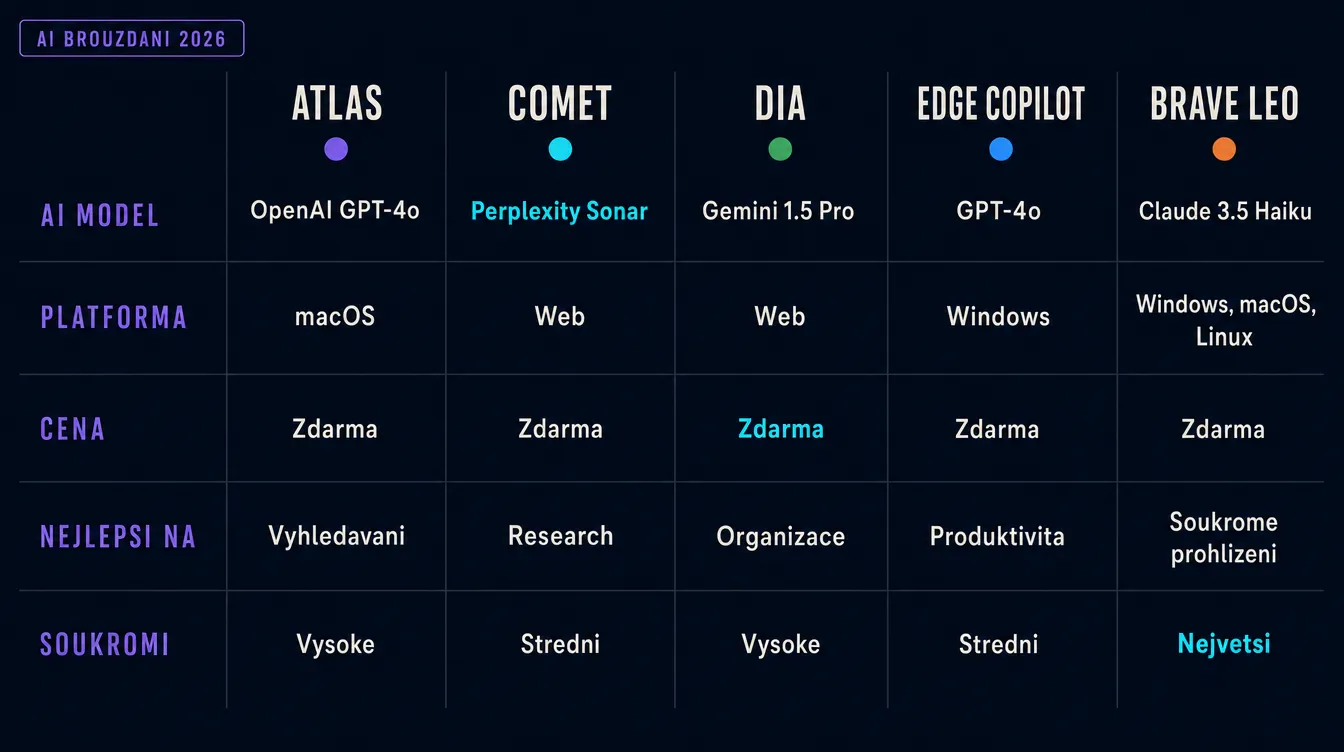
- ChatGPT Atlas. The easiest route to ChatGPT in a browser, with a sidebar, agent mode and memory. It will soon merge with the ChatGPT desktop app and Codex. The free tier works, while agent mode requires ChatGPT Plus.
- Perplexity Comet. A research-first browser. If you research daily, read sources and need citations, it is difficult to beat. The default model is Claude Opus 4.6 in the Max plan, and it is available across desktop and mobile platforms.
- Dia. Skills workflows plus tab memory. It is best for work in SaaS apps such as Notion, Slack, Linear and Jira. It currently requires Apple Silicon on macOS, with Windows on a waiting list. Atlassian's acquisition should mean faster development and deeper integrations.
- Edge Copilot. The obvious choice for Microsoft 365 users. Edge reads Office, SharePoint, Outlook and Teams without extra configuration. The free tier does a great deal, while Copilot Pro at $22 per month unlocks GPT-5 preview and more agentic features.
- Brave Leo. Privacy-first AI with no conversation storage. Its free tier uses open-source models such as Mixtral and Llama 3.1 plus Claude Haiku, while the $15-per-month premium plan adds Claude Sonnet 4. For client materials, legal documents and sensitive data, it is the only serious option.
Summary
The AI browser is no longer an experiment. Atlas, Comet, Dia, Edge Copilot and Brave Leo address five different needs, and each wins somewhere. Atlas suits ChatGPT users and OpenAI's future unified app across desktop, web research and code. Comet suits people who need source-backed research and delegation of repeated tasks. Dia excels in SaaS applications where its Skills catalogue saves clicks. Edge Copilot belongs in Microsoft 365. Brave Leo serves privacy-first users.
Atlassian's $610 million acquisition of The Browser Company shows how seriously the market takes this category. When one of the world's largest SaaS companies intends to build a work browser around an AI agent, this is more than a trend. It is becoming a new productivity layer alongside CRM, email and calendars.
Security is the other side of the coin. According to OpenAI, prompt-injection attacks may never disappear completely. The practical defence is to keep agent mode away from banking, company email and sensitive data. The risk is low for ordinary research and summarisation. Autonomous production work should still be treated as an experiment.
One final tip: you do not have to use only one AI browser. Many colleagues run two in parallel. Atlas or Comet handles 80% of daily work, while Brave Leo is reserved for sensitive client projects. It costs nothing extra, keeps memory separate and divides the risk. Test them and find the combination that fits.
Research
ChatGPT users
Microsoft 365
Privacy
Sources
- Introducing ChatGPT Atlas (OpenAI)
- ChatGPT Atlas Release Notes (OpenAI Help Center)
- Introducing Comet (Perplexity Hub)
- Comet Browser
- Dia Browser official site
- Atlassian acquires The Browser Company (Atlassian)
- Mitigating prompt injection risk (Anthropic)
- OpenAI says AI browsers may always be vulnerable to prompt injection (TechCrunch)
- Brave Leo AI Assistant
- Microsoft Edge with Copilot
Frequently asked questions
What people often ask
What is an AI browser, and how is it different from ordinary Chrome?
An AI browser includes an assistant that can read the context of the open page, summarise it, search across several sources and, in some cases, click on the user's behalf. Chrome does not provide the same agent capabilities at its core. Extensions can add AI, but an extension usually cannot see the complete workspace. Browsers such as Atlas, Comet and Dia put AI at the centre and can work across open tabs, forms and page content. The result is faster research, genuine task delegation and memory across sessions.
Is it worth moving from Chrome to an AI browser?
It depends on how much of your day happens in the browser. If you research, write content, handle email or process data in SaaS apps every day, an AI browser can save an hour. If you use the browser passively, you may barely notice a difference. Install one as a secondary browser and spend the first week doing your most repeated tasks in it. Move completely if it improves the workflow. If it does not, keep Chrome and add an AI extension.
Are AI browsers safe?
Not automatically. The main risk is prompt injection: an attacker hides an instruction on a page and your AI agent executes it as though it came from you. In August 2025, Brave Security published a real case in which Comet extracted a user's email address and one-time password from a Reddit post. In December 2025, OpenAI acknowledged that prompt injection might never be eliminated completely. The practical defence is to keep agent mode away from banking, company email and sensitive data. Research and summarisation carry relatively low risk; autonomous production tasks are still experimental.
Can I use several AI browsers at once?
Yes, and it often makes sense. Atlas and Comet complement each other well, while Brave Leo works as a third browser for sensitive data. The disadvantage is fragmented memory. Work context saved in Atlas memory will not exist in Comet. Use one main browser for 80% of work and a second for a specific use case, such as Atlas for everyday work and Brave Leo for client materials.
Do these browsers work in languages other than English?
Mostly yes, with compromises. Atlas, Comet, Edge Copilot and Brave Leo handle many languages well in text tasks, summaries, translations and questions about page content. Dia supports them too, although its Skills catalogue interface is not fully localised. Agent mode sometimes fails to recognise unusual form labels. For ordinary research and writing this is not a major issue, but autonomous workflows should be tested before being trusted.
Keep going
Related articles
More guides from the same area, topics and tools.

Claude for small businesses: 15 workflows plus Claude Code for everything else
On May 13, 2026, Anthropic launched Claude for Small Business: 15 ready-made AI workflows connected to QuickBooks, PayPal, HubSpot, Canva, DocuSign, Google Workspace and Microsoft 365. Here is what they do, how much time they save and where Claude Code fills the gaps.

What can Gemini Spark do? Google shows what a practical AI agent looks like
At I/O 2026, Google introduced Gemini Spark, an independent AI agent that runs continuously in the cloud and works with Gmail, Docs and partners such as Canva and Instacart. It has launched only in the US so far, but it shows where every major AI company is heading.

What are AI skills, and why are they the future of work with AI agents?
Skills turn AI tools such as Claude Code, Codex and Cursor into repeatable systems that apply your know-how consistently. Learn the principle, see three strong GitHub repositories and inspect a real editorial skill that helped produce this article.