

Claude for small businesses: 15 workflows plus Claude Code for everything else
On May 13, 2026, Anthropic launched Claude for Small Business: 15 ready-made AI workflows connected to QuickBooks, PayPal, HubSpot, Canva, DocuSign, Google Workspace and Microsoft 365. Here is what they do, how much time they save and where Claude Code fills the gaps.
Practical guide
Claude + Claude Code
What is new
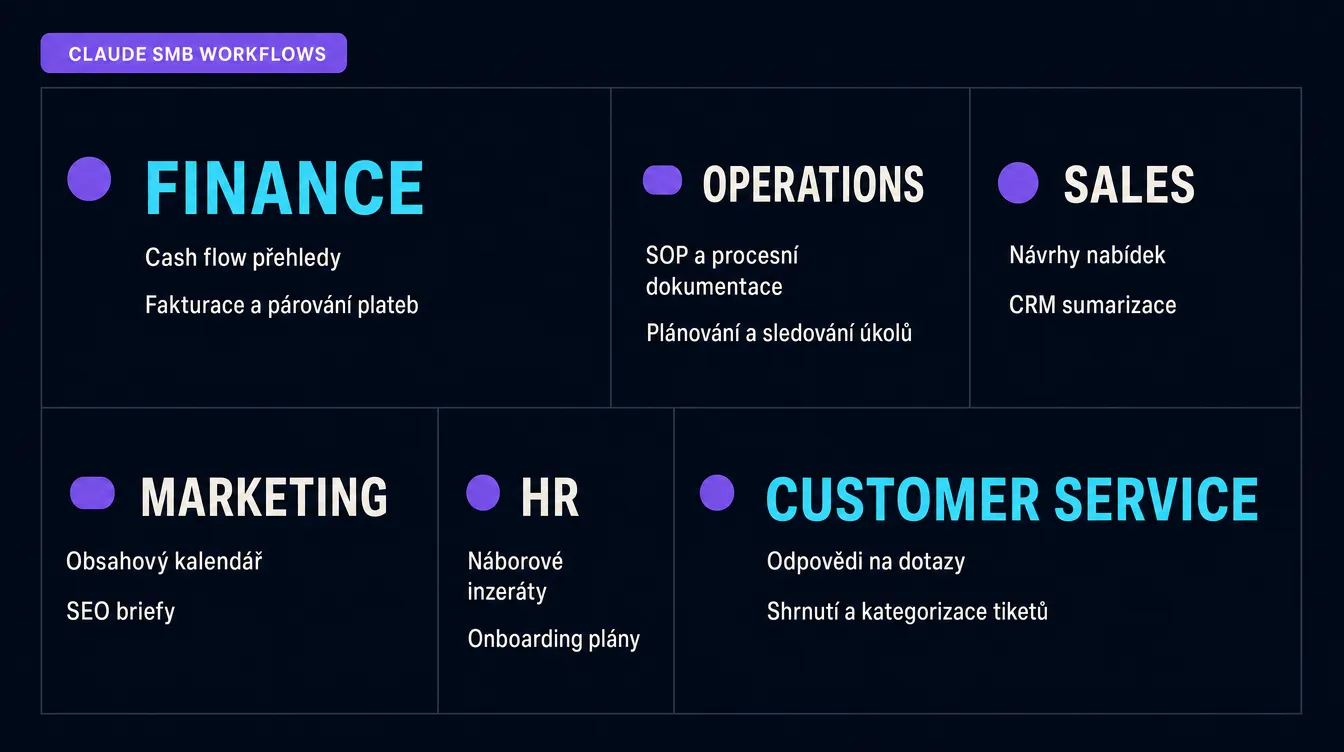
On May 13, 2026, Anthropic released Claude for Small Business, a package of 15 ready-to-run agentic workflows connected to the tools small companies already use. These include QuickBooks, PayPal, HubSpot, Canva, DocuSign, Google Workspace and Microsoft 365. The workflows cover six areas: finance, operations, sales, marketing, HR and customer service.
Anthropic is responding to a clear problem. Small businesses account for 44% of US GDP and employ almost half of the private-sector workforce, yet AI adoption in this segment trails larger companies. Daniela Amodei, Anthropic's co-founder and president, argues that AI may be the first technology capable of narrowing the gap in access to expertise between small companies and large competitors.
The price is surprisingly accessible. There is no extra charge beyond an ordinary Claude subscription. If you have Claude Pro at $20 per month, Max at $100 or a Teams plan at roughly $25 per user, the workflows are included. Some connectors such as QuickBooks, HubSpot and DocuSign have separate subscriptions, but the Claude integration itself costs nothing extra.
Anthropic also added a free AI course with PayPal and a ten-stop workshop tour across US cities. The tour has not reached Europe, but the online courses are available anywhere.
- QuickBooks
- PayPal
- HubSpot
- Canva
- DocuSign
- Google Workspace
- Microsoft 365
- Slack
What will you appreciate most?
It saves an afternoon every week. For a typical small company with 5 to 15 employees, the realistic administration saving is between 5 and 15 hours a week. In practice, that is the difference between spending Monday on invoices and marketing or spending it with a client. Data from the first week after launch suggests the largest savings come from finance workflows such as Invoice Chaser and Month-End Closer, and from customer-service work such as Support Ticket Triage.
Running within an hour
Approval mode
Memory across tasks
No extra charge
The second benefit is that every workflow is modular. This is not one enormous automation that must be either enabled or disabled. You can turn on only Invoice Chaser, run it for a month and add Content Calendar Generator later. A gradual rollout reduces the chance that Claude does something unexpected before you understand how the workflow behaves.
The third benefit is company memory. When Claude handles a month-end close, it can see previous closes, exceptions you flagged and changes in transactions. The second month becomes more accurate because Claude understands what you expect. That continuity is difficult to get from an outsourced accountant or a conventional Make scenario.
Who it is for
Claude for Small Business has a clear audience. It is not an enterprise product or a tool for a solo freelancer with a laptop. It is for a company where administration is the bottleneck.
Small-business owner
- Invoicing
- Payroll
- Cash flow
- Contracts
- Tax
Marketing manager in an SMB
- Campaigns
- Content
- Attribution
- Leads
Freelance operations consultant
- Clients
- Onboarding
- Contracts
- Reports
Developer with an online store
- Stripe
- Logistics
- Customer service
- Reports
A useful rule: if administration takes more than five hours a week and the company's main tools are cloud SaaS products, Claude for Small Business can pay for itself in the first month. If everything lives on a private server and in Excel, Claude Code may offer more value than prepared workflows.
How to use it in practice
Before following the setup, explore the workflows below. Choose a category, review the descriptions and see the estimated time saving. Once one workflow makes immediate sense, start with that one. There is no need to deploy all of them at once.
What can Claude actually do for a small business?
Choose a category to see the workflows, connectors and estimated time savings. Every workflow waits for your approval before it sends a message or makes a payment.
Finance
Payroll, closing, cash flow, invoicing and tax.
Payroll Planner
saves 2–4 hours monthlyPulls employees and pay periods from QuickBooks, checks them against available cash, calculates gross payroll and flags exceptions for approval.
Month-End Closer
saves 4–8 hours monthlyMatches QuickBooks transactions with bank statements, identifies discrepancies and prepares closing documentation.
Cash Flow Forecaster
saves 2–3 hours weeklyBuilds a 30-day cash-flow forecast from transaction history and open items, then explains the implications in plain English.
Invoice Chaser
saves 3–5 hours weeklyFinds overdue invoices and drafts reminders in the tone you normally use with each client. It waits for your approval before sending anything.
Tax Prep Pack
saves 6–12 hours yearlySorts annual transactions into tax categories and prepares an organised package for your accountant.
Keep the rollout disciplined. Run only one workflow in approval mode during the first week. Invoice Chaser and Cash Flow Forecaster are strong starting points because each produces a clear output, a message or report, that can be checked quickly. Once the first workflow has run reliably for a week, add a second. Gradual adoption forces you to notice mistakes before they become normal.
When a workflow reaches its limit, Claude Code takes over. Three situations are particularly common:
- A custom internal API. The HubSpot connector is useful, but perhaps your CRM is a Notion database with a custom Make workflow. Claude Code can expose the Notion API through an MCP server and write a skill that behaves like an official workflow.
- Sensitive local data. You may not want client contracts, legal documents or tax materials inside web-based Claude. Claude Code runs in a terminal on your computer, sees only what you expose and sends only the requested work to the model.
- Local requirements. Prepared tax workflows may be designed for US categories. A company elsewhere needs its own reporting, tax checks and accounting-system integrations. Claude Code can write a skill for tasks that Anthropic does not include by default.
In Claude Code, you can build sub-agents as specialised roles for accounting, marketing and support, hooks as rules that run before or after an action, and MCP servers to connect external systems. For more detail, read our guide to AI skills, which explains repositories and the anatomy of a skill.
Practical example
A month-end close that used to take two days now takes 30 minutes. I run a small marketing studio with five people. At the end of every month, I downloaded bank transactions, imported them into Excel, matched them with invoices in the accounting system, found discrepancies, wrote a P&L summary and sent it to the accountant. It took 12 to 14 hours, usually on a quiet Saturday. After deploying Month-End Closer and connecting it to the accounting system, Claude reviews everything in four minutes, highlights two or three discrepancies and prepares a plain-language closing package. I review the exceptions, approve the result and send it to the accountant. The entire close now takes 25 to 35 minutes. A small Claude Code skill covers the tax categories the ready-made workflow does not understand.
This pays off most for a small-business owner handling their own bookkeeping or working with a part-time accountant, a marketing agency producing monthly client reports, an online store reconciling payment gateways with accounting, or a consultant billing several clients under different terms. In each case, ROI is measured in weeks.
Recommended tools
- Claude Pro or Max. Pro at $20 per month is enough for a small company to begin. If you need several workflows in parallel and longer context, Max at $100 per month offers more capacity. A Teams plan makes sense for three or more people.
- Claude Code. A terminal agent for situations where a prepared workflow is not enough. Install it with
npm install -g @anthropic/claude-code, open it in a project directory and describe the task. Sub-agents, hooks and MCP servers make it an operations layer for a small company, not only a coding assistant. - QuickBooks, HubSpot and DocuSign. Three connectors with particularly high impact. If your accounting platform has no prepared connector, Claude Code can expose its API through an MCP server and create a similar workflow.
- Slack and Google Workspace. Common connectors for small companies. Ticket triage, performance-review preparation and content-calendar generation can run through them with little extra setup.
- Make or Zapier. Do not rewrite working automations simply because Claude exists. Add Claude as another step that reviews drafts and supports decisions. Over time, you will see where Make remains useful as a trigger and where Claude should handle judgement.
Summary
Claude for Small Business is the first serious attempt to build an AI package specifically for small companies, rather than for enterprises or developers. Its 15 workflows cover the work that consumes owners' weeks: finance, operations, sales, marketing, HR and customer service. The price is fair, approval mode keeps risk manageable and memory across tasks builds genuine continuity.
Prepared workflows are enough for roughly 80% of typical tasks. For the remaining 20%, where a custom integration, sensitive data or local context matters, Claude Code takes over. Setup takes an afternoon and returns value within months.
The hardest part is organisational rather than technical. Run in approval mode for the first month, review outputs and correct inaccuracies. After a month, it becomes clear where Claude can work more autonomously and where manual review remains essential. Over time, the company develops a set of workflows that covers most administration without constant attention.
Choose the first workflow where the pain is greatest. For many small-business owners, that is Invoice Chaser for cash collection or Month-End Closer for reclaimed weekends. Marketing companies should begin with Content Calendar Generator, and service companies with Support Ticket Triage. Finish the first workflow before adding a second.
Price
Saves
Safety
Claude Code
Sources
- Introducing Claude for Small Business (Anthropic)
- Claude for Small Business: 15 Agentic Workflows, 15 Skills, and 10+ Connectors Explained (ChatForest)
- Claude for Small Business ships 15 agent workflows (The Decoder)
- Anthropic offers new Claude Code tools for small businesses (Axios)
- Anthropic launches Claude for Small Business with new automation workflows (SiliconANGLE)
- Claude Code Agent Teams, Subagents, and MCP: The 2026 Playbook (Developers Digest)
- Understanding Claude Code's Full Stack: MCP, Skills, Subagents, Hooks Explained (alexop.dev)
- Create custom subagents (Claude Code Docs)
Frequently asked questions
What people often ask
What is Claude for Small Business, and how is it different from ordinary Claude?
It is a package of 15 ready-to-run agentic workflows launched by Anthropic on May 13, 2026, available inside standard Claude Pro, Max and Teams plans. Instead of explaining what Claude should do with invoices, contracts or leads every time, you choose a prepared workflow, approve access to a connector such as QuickBooks, HubSpot or DocuSign and let Claude begin. The key difference is that the workflow already knows the process, waits for approval before taking action and remembers your context across sessions.
How much does Claude for Small Business cost?
Anthropic includes it with existing plans at no extra cost: Claude Pro at $20 per month, Max at $100 or $200 per month, and Teams at roughly $25–30 per user. Some connectors such as QuickBooks, HubSpot and DocuSign have their own subscriptions, which the company pays separately, but connecting them to Claude costs nothing extra. Google Workspace, Microsoft 365 and Slack are the most relevant connectors for many small companies because they are already part of their software stack.
Can I let Claude access company data safely?
It can be safe, with conditions. The workflows require approval before every action such as sending an email, issuing an invoice or signing a contract. Claude accesses QuickBooks or HubSpot through official APIs with permissions you configure. Anthropic says company data is not used to train its models. The remaining risks are familiar AI problems: misinterpretation, hallucinated numbers and missing context. Run every workflow in approval mode for the first month and review the outputs. You will then see where greater trust is reasonable and where human checks remain essential.
Who should use Claude for Small Business, and when does it not make sense?
It suits companies with 1–50 employees where an owner or manager spends more than five hours a week on administration such as invoicing, payroll, contracts, lead management and content calendars. If dedicated accounting, marketing and sales-operations specialists already work in mature systems, Claude will help only at the margins. If one person does everything and repeated tasks are the bottleneck, it can realistically save 5 to 15 hours a week. Companies with more than 100 employees should usually consider enterprise Claude or a custom agent stack built with Claude Code.
When should I use Claude Code instead of a ready-made workflow?
Use it when you hit a limit. Typical cases are a custom internal API with no matching connector, sensitive files you do not want to open in the web version of Claude, or a process with steps none of the 15 workflows supports. Open Claude Code in a terminal, describe the workflow and let it build a skill, sub-agent or MCP server that extends the ready-made workflow. The setup takes an afternoon and can repay itself within weeks.
Keep going
Related articles
More guides from the same area, topics and tools.

Atlas, Comet, Dia or Edge: which AI browser can really save you an hour a day?
Atlas, Comet, Dia, Edge Copilot and Brave Leo: five AI browsers, different philosophies and an interactive guide that finds the right one for you. Plus where AI overreaches and where it genuinely saves an hour a day.

Can an AI agent prepare your marketing report every morning?
GA4 has added the AI Assistant channel, Google made Meridian MMM freely available and Looker gained agentic workflows. Here is the reporting stack you can build today, where governance belongs and where the tools still fall short.

What are AI skills, and why are they the future of work with AI agents?
Skills turn AI tools such as Claude Code, Codex and Cursor into repeatable systems that apply your know-how consistently. Learn the principle, see three strong GitHub repositories and inspect a real editorial skill that helped produce this article.