

What are AI skills, and why are they the future of work with AI agents?
Skills turn AI tools such as Claude Code, Codex and Cursor into repeatable systems that apply your know-how consistently. Learn the principle, see three strong GitHub repositories and inspect a real editorial skill that helped produce this article.
Practical guide
Claude Code + Codex
What is new
Agent Skills is an open format for extending AI tools with specialised processes. It works in Claude Code, OpenAI Codex, Cursor and Windsurf. Technically, a skill is a folder containing a SKILL.md file. That file has YAML frontmatter with two required fields, name and description, followed by Markdown instructions. It can also include sub-agents, templates, references, example outputs and executable scripts.
In Claude Code, the folder name becomes a command you can call directly. If the skill lives at .claude/skills/summarize-changes/, you invoke it in chat as /summarize-changes. Codex works similarly. The agent initially loads only the name and description, then opens the full instructions when it actually uses the skill. It behaves like a smart library in which the AI sees only the book spines and pulls the right volume when needed.
ChatGPT uses a different system, Custom GPTs, and Gemini does not currently support the skill format. The main skill ecosystem therefore centres on Claude Code, Codex, Cursor and Windsurf. Skills are portable between them, with small differences mainly in installation location.
- Claude Code
- Codex CLI
- Cursor
- Windsurf
What will you appreciate most?
- They save time. Build the process once and use it repeatedly. You no longer need to explain the desired format, essential checks and order of work every time.
- They keep output consistent. When AI has a clear process, its results become more stable. That matters for brand work, marketing, UI, reporting and code.
- They turn know-how into a system. Your decision-making logic no longer lives only in your head or Notion notes. A skill is a living document the AI can use directly.
- They work in automations. Once you have a skill, it can run in scheduled tasks, a CI pipeline or from a webhook. The same quality without manual supervision.
- They move between tools. A skill written for Claude Code will usually work in Codex or Cursor because all three share the Agent Skills standard.
The format works in three stages, from the moment the AI merely knows a skill exists to the moment it runs it:
01 · Discovery
02 · Activation
03 · Execution
The most important part of the entire format is description. The AI uses it to decide when the skill applies. A poor description means the skill never runs. An overly broad description makes it run where it should not. Anthropic and OpenAI both recommend keeping descriptions concise, giving them a clear scope and using the words a user would realistically use to name the task.
Who it is for
Skills are not only for developers. They are useful for anyone who performs repeated AI-assisted work with a stable process.
Marketer
- Ad creative
- Copywriting
- Landing audits
- A/B tests
- Meta descriptions
Developer
- Code review
- Debugging
- Documentation
- Test generation
- Refactoring
Freelancer
- Briefing
- Reports
- Onboarding
- Survey analysis
Business owner
- Newsletter
- Weekly summaries
- Data audit
- Customer operations
A useful rule: if you complete a task in the same way more than twice, it is a candidate for a skill.
How to use it in practice
These are the first three repositories I recommend trying. All support the Agent Skills standard and therefore work in Claude Code, Codex, Cursor and Windsurf.
Marketing Skills
Corey Haines
Best for
Marketers, growth teams, copywriters, PPC and CRO specialists.
UI UX Pro Max
Next Level Builder
Best for
Web designers, frontend developers, SaaS founders and landing-page creators.
Superpowers
Jesse Vincent
Best for
Developers who want AI to follow a disciplined process instead of assembling code too quickly.
Before you download anything
Skills are powerful because they contain instructions, files and sometimes executable scripts. Before downloading a third-party skill, inspect its SKILL.md and scripts/ folder. A skill can read files from disk, access the network or send data outside your environment. Test it on a disposable project first, then allow it near company data only after review.
This article was created with the help of a skill. The aizona-article skill is an editorial pipeline that takes a brief, article structure and core arguments and returns a complete approval package: a finished MDX file in content/articles/, a hero image in public/images/, an infographic, frontmatter matching the site's schema, an AEO-ready summary and FAQ, and a notification report. It produces the Czech article, runs copywriting and humanizer passes and prepares everything for review before production.
The pipeline has eight sub-agents, each with a narrow responsibility:
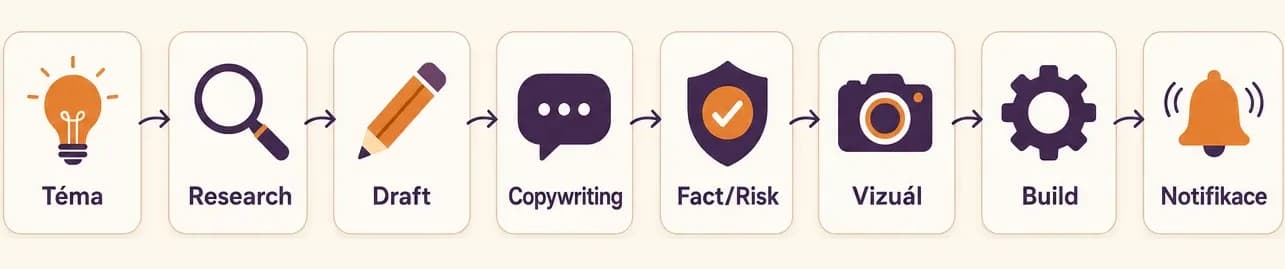
- Orchestrator decides which agents to run, merges their outputs and prepares the final notification.
- Research Agent reads existing articles, finds overlap, gathers sources and recommends an angle.
- Article Agent writes the first draft in the required structure: What is new, The best part, Who it is for, How to use it, Recommended tools, Summary and Sources.
- Copywriting Agent runs the text through copywriting, copy-editing and humanizer skills to remove AI tells, awkward borrowed language and translated sentence structure.
- Fact And Risk Agent activates for strong claims such as "best," "strongest," prices and benchmarks, then checks whether the sources support them.
- Visual Agent generates a text-free hero image and an inline infographic through the Higgsfield CLI, choosing a palette based on the category.
- Image Integration Agent downloads PNG files from Higgsfield, converts them to WebP through sharp-cli and integrates them into MDX.
- Notification Agent returns a final approval message with a checklist of what passed and what still needs review.
Under the hood is a SKILL.md file in ~/.claude/skills/aizona-article/. Its frontmatter looks roughly like this:
---
name: aizona-article
description: Generate one ready-to-publish article for aizona.cz (Czech AI magazine). Runs full editorial pipeline including research, deduplication, drafting in Czech, copywriting and fact/risk pass, hero image, infographic, and approval-ready notification. Never publishes, always hands off to user for review.
---
The description is the most important part. Claude uses it to recognise that the skill should run when I write "create an Aizona article about..." or "write an article on topic X." Without a good description, the skill would sit in its folder and never be called.
The ## Critical rules (don't skip) section contains rules the skill actively enforces: no long dashes in the middle of sentences, no paragraphs beginning with \d+\. because that breaks MDX rendering, required topics in frontmatter, one text-free hero image, WebP format and a copywriting humanizer pass. These are exactly the details I start forgetting after the third week of work. The skill never forgets them.
The key difference from an ordinary prompt is that the skill is not one block of text in a chat window. It is an editorial pipeline that divides work among specialised sub-agents, enforces quality rules and integrates external tools such as Higgsfield for images, sharp-cli for file conversion and git for staging in a worktree. Done manually, half of those checks would eventually be missed. The skill returns the same quality whether I am tired, in a hurry or no longer have the patience to revisit a style checklist.
Recommended tools
- Claude Code. The primary environment in which skills are created and used most often. A local CLI with strong support for the Agent Skills standard.
- Codex CLI. OpenAI's alternative agent with skills support, useful when you want workflows portable between Anthropic and OpenAI models.
- Cursor and Windsurf. AI editors for developers that support the skill format and combine it with full IDE integration.
- Anthropic skill-creator. A meta-skill that guides you through creating a custom skill step by step. The ideal starting point for a first skill.
- Anthropic Skills repository. The anthropics/skills repository is Anthropic's official catalogue. It includes document skills for DOCX, PDF, PPTX and XLSX files, example skills and reference implementations. Start here to understand what a well-written skill looks like.
Summary
Skills move AI from a chatbot toward a working system. Instead of repeatedly explaining how the AI should work, package your know-how into a skill once. From then on, the agent can use it repeatedly, more quickly and consistently, including inside automations.
The three repositories in this article provide an immediate starting point. Use Marketing Skills for marketing, UI UX Pro Max for websites and interfaces, and Superpowers when you want AI to follow a disciplined engineering process. All three support Claude Code, Codex and Cursor.
You can write your own skill in an afternoon. The key is a good description that tells AI when to use it. Save the process in SKILL.md, test it in a sample project and iterate. The first version will be rough, but it will still save more time than even an excellent prompt rewritten by hand.
Be careful with third-party skills. Before installation, read SKILL.md, inspect scripts/ and test the skill in a disposable project. Allow only trusted skills near company data or production systems.
Skills are only the beginning. Combining a skill, sub-agent and automation creates an AI assistant that genuinely works on your behalf. That is the next step.
Custom skill
3 repositories
4 tools
Audit third-party skills
Sources
Frequently asked questions
What people often ask
What are AI skills, and what are they used for?
A skill is a saved workflow for an AI agent. It consists of a folder containing a SKILL.md file with a description of when the skill should be used and instructions written in Markdown. Tools such as Claude Code, Codex and Cursor load the skill when a task matches its description. Instead of improvising from a new prompt every time, the AI follows the process packaged in the skill. This saves time, keeps quality consistent and prevents your know-how from disappearing into chat history.
How do I create a custom skill in Claude Code?
Create a folder under .claude/skills/<skill-name>/ and add a SKILL.md file. Its frontmatter needs two fields: name and description, which Claude uses to decide when the skill applies. Write the actual instructions, process and rules in Markdown below the frontmatter. Anthropic recommends beginning with the skill-creator skill, which guides you through the process. Test the skill on a sample project and iterate. The first version may be rough, but it will still save more time than rewriting the prompt manually.
What is the difference between a skill and an ordinary prompt?
A prompt is written once, produces an answer and disappears into chat history. A skill is a saved file that the AI finds and uses whenever you handle a similar task. A skill can be more complex, containing several files, sub-agents, scripts, templates, examples and checklists. The main difference is repeatability. A prompt is a one-off instruction; a skill is a systematic process. For recurring tasks, it produces the same type of result without requiring you to explain the workflow again.
Are third-party skills from GitHub safe?
Not automatically. Skills can include instructions, support files and executable scripts in a scripts/ folder. A poorly written or intentionally harmful skill may read files on disk, send data over the network or perform operations you did not intend. Anthropic explicitly warns users to audit skills from unknown sources. Before installation, read SKILL.md, inspect scripts/ and test the skill in a disposable project. Allow only trusted skills near company data or production access.
Do skills also work in Codex or Cursor?
Yes. Agent Skills is an open format supported by OpenAI Codex CLI, Cursor and Windsurf as well as Claude Code. A skill written for one platform usually works on the others because they share the same structure: a folder, SKILL.md, frontmatter and instructions. Minor differences include the installation path and how each tool triggers skills from their descriptions. Repositories such as coreyhaines31/marketingskills and nextlevelbuilder/ui-ux-pro-max-skill list their supported tools in the documentation.
Keep going
Related articles
More guides from the same area, topics and tools.

Atlas, Comet, Dia or Edge: which AI browser can really save you an hour a day?
Atlas, Comet, Dia, Edge Copilot and Brave Leo: five AI browsers, different philosophies and an interactive guide that finds the right one for you. Plus where AI overreaches and where it genuinely saves an hour a day.
GPT-5.5: OpenAI's strongest model for complex work?
OpenAI introduced GPT-5.5 as its smartest model yet for complex work, coding and automation.

Claude for small businesses: 15 workflows plus Claude Code for everything else
On May 13, 2026, Anthropic launched Claude for Small Business: 15 ready-made AI workflows connected to QuickBooks, PayPal, HubSpot, Canva, DocuSign, Google Workspace and Microsoft 365. Here is what they do, how much time they save and where Claude Code fills the gaps.