
What can Gemini Spark do? Google shows what a practical AI agent looks like
At I/O 2026, Google introduced Gemini Spark, an independent AI agent that runs continuously in the cloud and works with Gmail, Docs and partners such as Canva and Instacart. It has launched only in the US so far, but it shows where every major AI company is heading.
News analysis
Gemini Spark + Gemini 3.5 Flash
What is new
At I/O on May 19, 2026, Google showed Gemini Spark, an agentic layer for the Gemini app that behaves very differently from a conventional chatbot. Instead of waiting for another message, it receives one instruction and works on it independently in the background. Alphabet CEO Sundar Pichai described it as the next evolution of intelligent digital assistants, taking on long-running tasks with minimal supervision.
Spark runs on Google Cloud virtual machines, not in your browser. You can close your laptop or lock your phone and the agent keeps working. It uses the new Gemini 3.5 Flash model and the Google Antigravity framework, which gives the base model memory, planning and the ability to call tools across applications.
Works 24/7
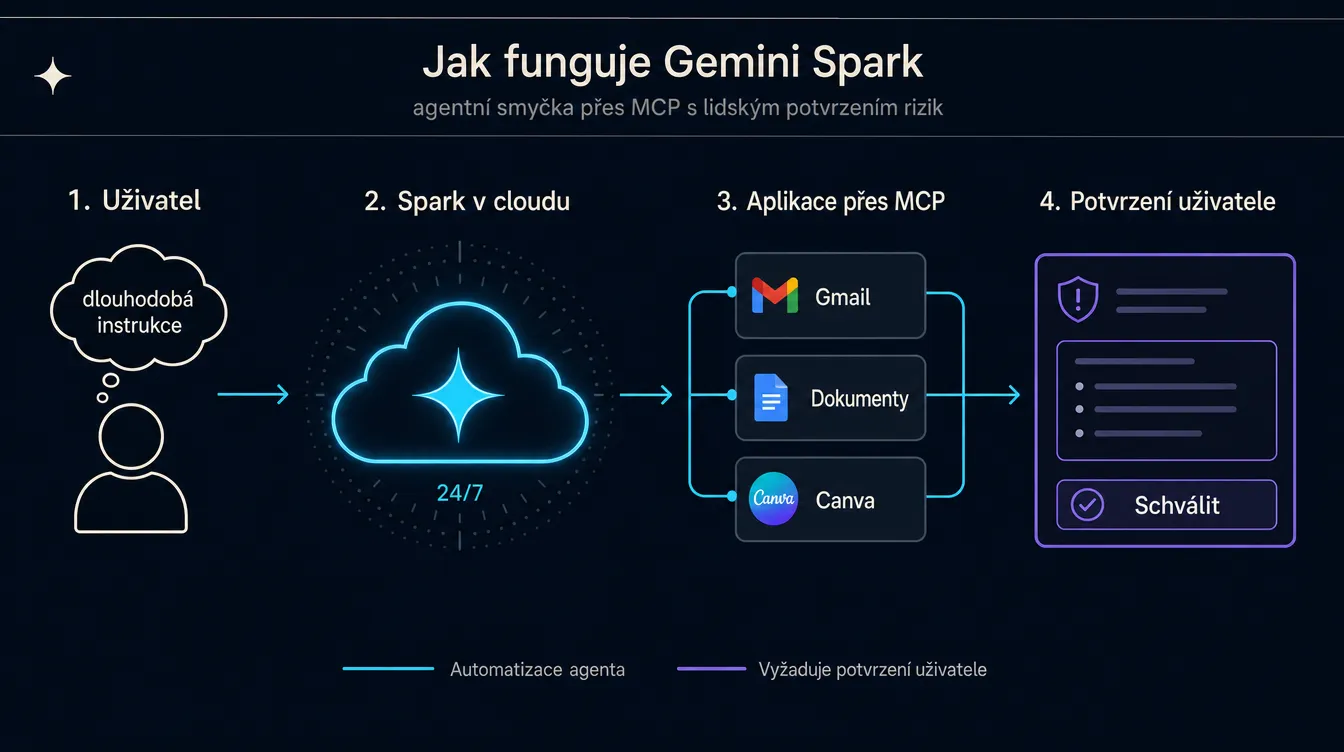
Spark runs continuously in the cloud. It keeps working while your devices are off and contacts you when the result is ready.
Its own email address
Spark receives its own Gmail address and uses it to send messages under your supervision.
MCP connectors
It connects to apps through the open MCP protocol. Canva, OpenTable and Instacart are available first, with more partners to follow.
Risk confirmation
Before sending an email or spending money, Spark asks the user. It cannot take a risky action without approval.
At launch, Spark integrates with the full Google Workspace suite, Chrome for web tasks and the Halo system in Android, which shows task progress on mobile. There are three external apps so far: Canva for visuals, OpenTable for reservations and Instacart for shopping. Google says more partners will be added gradually through Model Context Protocol, which is built into Spark.
What will you appreciate most?
It saves hours every week on routine work you dislike. Monitoring customer inboxes, summarising reports from Docs and Sheets, and preparing draft replies to long email threads are tasks that consume every workday. Spark handles them in the background and interrupts you only when it needs approval for a sensitive action.
The second major strength is risk approval. Most current AI agents force a choice between full autonomy and none. Spark uses an asymmetric model instead: it prepares drafts, reads and analyses on its own, but asks you to approve payments and outgoing emails. For a company trying to bring AI into real work, that is far more manageable than closing its eyes and hoping for the best.
Who it is for
Marketing team
The agent can act as an overnight information collector. Open Gmail in the morning and find one message summarising every customer question that previously had to be assembled manually.
- Customer inboxes
- Campaign data
- Newsletter drafts
- Mention monitoring
Small-business founder
Spark can handle work usually given to an assistant. It regularly reviews bank statements, highlights unusual payments and sends them for approval, saving an hour every day.
- Invoice checks
- Hidden fees
- Meeting summaries
- Calendar
Developer and tech team
For developers, the most interesting part is the Antigravity framework behind Spark. Google plans to open custom sub-agents over time, allowing teams to build agents for specific workflows.
- GitHub notifications
- Code review drafts
- Error report monitoring
Freelancer and consultant
When you juggle five clients, Spark can monitor each one separately. It prepares draft replies while you review and send them.
- Client email
- Proposals
- Feedback aggregation
For an ordinary user who asks a chatbot one question a day, Spark is excessive. It makes sense where the same process repeats and where the time needed to set up an agent will pay off.
How to use it in practice
Spark currently requires a US account on the Google AI Ultra plan. For people outside the US, that means waiting. Testing through a VPN is a poor idea for a tool that accesses your real Gmail. Once Spark reaches your region, a realistic setup will look like this:
1. Identify a routine
Find a repeated task that consumes time, such as customer replies, invoice checks or project monitoring in Docs.
2. Connect applications
In the Gemini app, allow Spark to access Workspace tools and third parties through MCP. Start with the minimum, not everything at once.
3. Write a lasting instruction
Write once: "Every morning, review the inbox, find unanswered customer questions, summarise them and save them to a new Doc."
4. Approve only risks
Spark runs independently and asks you only before sending an email or making a payment. Review the rest with your morning coffee.
A good rule at the beginning is not to give Spark access to your production Gmail account. Create a test account, try three or four instructions and see how the agent handles edge cases. Only then should you open access to real data.
Practical example
Pavla is a freelance copywriter with eight clients, each of whom emails at a different frequency. She spends four hours a week simply sorting Gmail. When Spark becomes available, she gives it one instruction: "Every day at 9 a.m., review the inbox, find emails in which a client asks me for a revision or feedback, and summarise them by client in one Doc. Prepare replies as Gmail drafts, but do not send them."
Spark works overnight. In the morning, Pavla opens the document, reviews the summary in twenty minutes, then opens Gmail, edits the prepared drafts and clicks Send. The original four hours a week becomes two, and she spends the remaining time on paid work. After a month, she adds a second instruction for monitoring invoices, and Spark takes on part of the accounting workload too.
A risk to watch: Spark can see all your emails, including personal messages. If a client has an NDA or you work with sensitive data, create a separate Workspace account specifically for agent work. Mixing personal Gmail with agentic automation is a step backwards for data protection.
Recommended tools
Spark is not yet available outside the US. If you want to begin using agentic AI now, two existing tools follow the same principle and work in more countries. They are worth comparing because each suits a different type of work.
Claude Cowork
Anthropic
A cloud-based agent with full Claude Skills support. Strong on long coding and research tasks. Available in Europe. Pricing depends on the Claude Pro or Claude Max plan.
Best for
Developers, researchers
ChatGPT Agent
OpenAI
A broad plugin ecosystem and large community, powered by GPT-5.5. Available in ChatGPT Plus and Team plans, but with weaker Google ecosystem integration.
Best for
General work automation
Gemini Spark
Deep integration with Gmail, Docs and Sheets. Requires Google AI Ultra from $100 per month. Currently available only in the US.
Best for
Companies using Google Workspace
- Gmail
- Google Docs
- Google Slides
- Chrome
- Android Halo
- Canva
- OpenTable
- Instacart
If you live and work in Google Workspace, Spark is likely to become the best choice of the three, but you have to wait for it. For everyone else, Claude Cowork is currently the strongest fit, largely because Claude Skills let you package your know-how and make Cowork apply it consistently to every task.
Summary
Gemini Spark is here to show what everyday AI should look like in 2026. You do not wait for the next prompt, repeat instructions or memorise shortcuts. Give the agent a task once, and it tells you when it has found something or needs approval for a sensitive action. The fact that it currently runs only in the US and only for Google AI Ultra subscribers is a temporary obstacle. The direction is clear.
For people outside the US, Spark is currently more of a signal than a usable tool. It gives you time to choose a competing agent that suits your work and begin using it before Spark arrives. Anthropic's Cowork and OpenAI's Agent provide that experience today. When Spark reaches your region, you will already know what to expect from an agent and which routine deserves to be delegated.
Sources
- Google Blog: The Gemini app becomes more agentic. Primary Gemini Spark announcement, May 19, 2026.
- TechCrunch: Google introduces Gemini Spark. Pricing and integration context.
- Engadget: Google's Gemini Spark is an agentic AI assistant. Security details.
- Tom's Guide: New $100 AI Ultra plan. Plan pricing strategy.
- CNBC: Google unveils AI model Gemini 3.5 and AI agent Gemini Spark. Wider I/O 2026 market context.
Frequently asked questions
What people often ask
What is Gemini Spark, and how is it different from ordinary Gemini?
Spark is an independent Google AI agent that can work for a long time without your presence. Ordinary Gemini responds to a question and stops when the answer is complete. Spark receives an instruction such as 'monitor the customer inbox and send me a summary every morning,' runs in the cloud on Google's virtual machines and contacts you when it has a result or needs approval. It can work in Gmail, inspect Docs and Sheets, prepare a draft and ask only before sending it. It is built on Gemini 3.5 Flash and the Google Antigravity agent framework.
When and where can I try Gemini Spark?
Google launched it with a small group of testers on May 19, 2026. Google AI Ultra subscribers in the US receive the beta a week later. No European release date has been confirmed. Google has previously introduced advanced Gemini features in the EU several months later, so a late-2026 European release is realistic if AI regulation does not cause further delays. Planned summer additions such as iOS, Android Halo and custom sub-agents are focused primarily on the US.
How much does Google AI Ultra cost, and who should pay for it?
After I/O 2026, Google split the plan into two levels. The lower AI Ultra tier starts at $100 per month and targets developers and advanced users. The full version costs $200 per month, down from $250, and includes twenty times higher limits in the Gemini app and Antigravity. That is expensive for ordinary office work. It makes sense for teams delegating repeated tasks such as inbox monitoring, report aggregation or email drafting at enough volume for the time saved to cover the $2,400 annual cost.
Is Spark safe? What if it sends a nonsensical email to a client?
Google requires confirmation for risky actions. Spark asks for user approval before spending money or sending an email. It can prepare drafts, read documents and inspect an inbox without approval because those actions do not affect anyone externally. That means Spark cannot make an impulsive external decision on its own, but it can still see sensitive Gmail data. Companies with GDPR commitments or strict security policies should wait for the Workspace version, where administrators can control what the agent may access.
Which is better: Gemini Spark, Claude Cowork or ChatGPT Agent?
It depends on where you already work. Spark has an unmatched advantage in its deep Google Workspace integration. A company living in Gmail and Docs does not need to build connections. Claude Cowork and ChatGPT Agent work similarly but are less tied to one ecosystem. Cowork is stronger on long coding tasks and uses Claude Skills. ChatGPT Agent has a broader plugin ecosystem and community. If you do not have Google AI Ultra or live outside the US, begin with Cowork or Agent today and revisit Spark when it reaches your region.
Keep going
Related articles
More guides from the same area, topics and tools.

Codex agents will run inside a company's own cloud. Why is OpenAI buying Ona?
OpenAI announced on June 11 that it is buying the German company Ona (formerly Gitpod). Codex agents will run for hours directly inside a customer's VPC, with audit logs and access control. What it changes for companies, banks and developers.

Atlas, Comet, Dia or Edge: which AI browser can really save you an hour a day?
Atlas, Comet, Dia, Edge Copilot and Brave Leo: five AI browsers, different philosophies and an interactive guide that finds the right one for you. Plus where AI overreaches and where it genuinely saves an hour a day.

Claude for small businesses: 15 workflows plus Claude Code for everything else
On May 13, 2026, Anthropic launched Claude for Small Business: 15 ready-made AI workflows connected to QuickBooks, PayPal, HubSpot, Canva, DocuSign, Google Workspace and Microsoft 365. Here is what they do, how much time they save and where Claude Code fills the gaps.